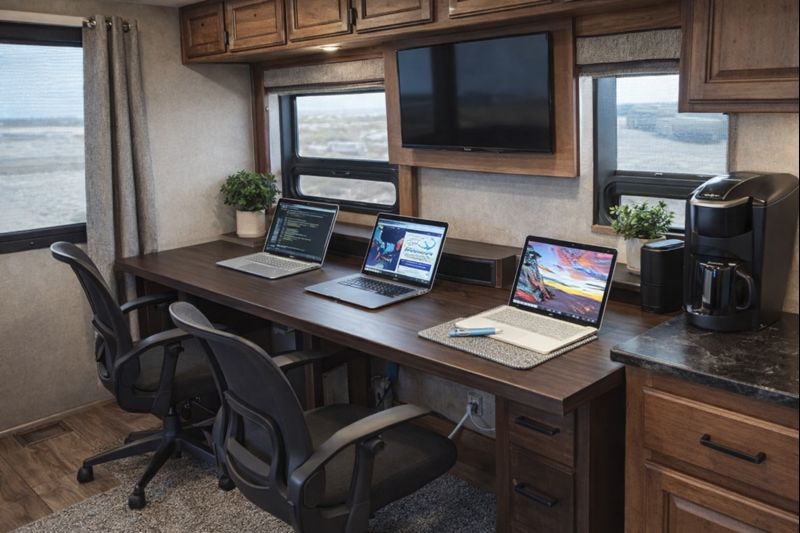
💡 Key Recommendation
Set up your RV workspace at dining table height with external monitor and swivel chair
Why This Matters
A poorly designed RV office space can severely impact your productivity and long-term health while living on the road. Working from cramped dinettes, inadequate lighting, or makeshift surfaces leads to neck strain, back pain, and decreased work performance that can jeopardize your remote work arrangement. Without proper ergonomics and dedicated workspace separation, many RVers find themselves unable to maintain professional standards or work-life balance.
Creating a functional mobile office is essential for sustaining the digital nomad lifestyle and maximizing your earning potential while traveling. A well-designed workspace improves focus, reduces physical discomfort, and creates professional video call backgrounds that maintain your credibility with clients and employers. The investment in proper office setup pays dividends through increased productivity, better health outcomes, and the ability to work comfortably from any location for extended periods.
📋 Industry Standards & Best Practices
Ergonomic workplace standards recommend monitor screens positioned 20-26 inches from your eyes at or slightly below eye level, with adjustable seating that supports proper posture for 6-8 hour work sessions. For RV offices, the Occupational Safety and Health Administration (OSHA) guidelines still apply, emphasizing adequate lighting (minimum 500 lux for computer work), proper ventilation, and workstation dimensions that accommodate standard keyboard and mouse positioning. Remote work best practices also suggest dedicated internet speeds of at least 25 Mbps download and 10 Mbps upload for video conferencing and file sharing.
🎯 Product Recommendations
Install a wall-mounted monitor arm system that allows screen positioning at proper ergonomic height while freeing up valuable desk surface area for other work materials
Convert your dinette area with a height-adjustable desk converter and ergonomic cushions to transform the existing seating into a proper office chair with lumbar support
Create a dedicated office nook by repurposing unused spaces like bedroom corners or living room areas with compact, multi-functional furniture designed specifically for small spaces
Complete Guide
The key to RV workspace success lies in recreating the ergonomic comfort of a traditional office within your limited space. Start with your seating situation – those fixed RV dinette benches are productivity killers. Invest in a compact, adjustable office chair that can swivel and roll. Look for chairs that fold flat or have removable backs for storage while traveling. Position this chair at your dinette table, which likely sits at the perfect height for comfortable typing.
Your laptop screen should never be your primary monitor for extended work sessions. Mount a 24-27 inch external monitor on an adjustable arm that can swing away when not in use. This setup allows proper eye-level viewing while maintaining space efficiency. The monitor arm can attach to your table edge or wall-mount behind your workspace. When combined with a wireless keyboard and mouse, you’ll have the screen real estate and ergonomics needed for serious productivity.
Internet connectivity makes or breaks the remote work experience. Don’t rely solely on campground WiFi – it’s often slow and unreliable. Invest in a cellular signal booster and maintain accounts with multiple carriers. A dedicated hotspot device separate from your phone ensures you always have backup connectivity. Position external antennas properly and learn to use signal strength apps to find the best spots in each location.
Lighting dramatically impacts both your productivity and video call appearance. RV lighting is notoriously dim and poorly positioned for work. Add a dedicated desk lamp with adjustable positioning, and consider a ring light for video calls. LED strip lighting behind your monitor reduces eye strain during long work sessions.
Storage organization keeps your mobile office functional. Create dedicated spaces for all work equipment using drawer organizers, hanging pouches, and cable management systems. Everything should have a designated spot that’s accessible while working but secure during travel. Use a laptop stand that doubles as storage for your wireless peripherals.
Sound management often gets overlooked but is crucial for professional calls. Invest in noise-canceling headphones and identify the quietest areas of your RV for important meetings. Sometimes this means working outside under your awning or finding alternative spaces during peak call times.
Consider your power needs carefully. Working remotely demands significant battery power, especially when running monitors and charging devices. Ensure your solar setup or generator can handle extended work sessions without compromising other RV systems.
The most successful RV remote workers establish routines and boundaries. Create ‘office hours’ where your workspace is off-limits to leisure activities, and develop shutdown rituals that help you transition from work to RV life enjoyment.
Step-by-Step Instructions
Step 1
Assess your RV layout and identify the best location for your office, considering natural light, proximity to power outlets, internet signal strength, and separation from living areas
Step 2
Measure the designated space and select appropriately sized furniture including an ergonomic chair, adjustable desk surface, and monitor positioning equipment that fits your dimensions
Step 3
Install proper lighting solutions including task lighting for computer work and ambient lighting to reduce eye strain during long work sessions
Step 4
Set up technology infrastructure including internet boosters, power management systems, cable organization, and backup power solutions to ensure consistent connectivity and equipment protection
💰 Cost Analysis
Initial investment: $800-2,500 for complete mobile office setup including ergonomic furniture, monitor arms, lighting, and workspace organization systems
Annual maintenance: $100-200 for equipment updates, furniture adjustments, and technology upgrades
5 year projection: $1,300-3,000 total including initial setup and ongoing maintenance costs
Cost per year: $260-600 annually when amortized over five years of use
🌍 Regional Considerations
Desert regions require additional consideration for equipment cooling and glare reduction, necessitating window treatments and potentially portable air conditioning for office areas
Humid coastal areas may need dehumidification solutions and moisture protection for electronic equipment and paperwork storage
Mountain regions with spotty cell coverage require more robust internet solutions like satellite systems and signal boosters for consistent connectivity
🌍 Case Studies
A full-time marketing consultant converted their Class A motorhome’s passenger seat area into a office by installing a swivel base, adding a slide-out desk, and mounting dual monitors on adjustable arms, creating a professional workspace that rivals traditional offices
Travel trailer owners transformed their dinette by replacing fixed seating with a compact ergonomic office chair and installing a hydraulic desk that adjusts from dining height to proper work height with storage underneath for office supplies
Van life entrepreneurs created a rear office pod by removing rear seating and building a custom workspace with fold-down desk, wall-mounted monitor, and ceiling-mounted LED lighting that provides both task and ambient illumination
🔍 Common Misconceptions
Many believe working from the dinette is adequate for full-time remote work, but the fixed height and booth-style seating creates ergonomic problems that lead to chronic pain and reduced productivity over time
RVers often think they need a separate room for a home office, when properly designed compact workspaces can be just as functional and more practical for the mobile lifestyle
Some assume that mobile offices can’t be as professional as traditional setups, but with proper equipment and design, RV offices can provide superior functionality with the added benefit of changing scenic views
📊 Comparison Analysis
🔧 Tools & Equipment
Drill with various bits for mounting monitor arms and installing workspace furniture securely
Measuring tools including tape measure and level for proper ergonomic positioning of equipment and furniture
⏱️ Time & Cost Summary
Estimated Time: 2-5 days for complete mobile office setup, including 1 day for planning and measuring, 1-2 days for furniture installation, and 1-2 days for technology setup and workspace organization
Estimated Cost: $800-2,500 total investment including ergonomic seating ($200-600), adjustable desk solutions ($150-400), monitor positioning equipment ($100-300), lighting improvements ($100-200), and technology infrastructure ($250-1,000)
📅 Maintenance Schedule
⚠️ Safety Considerations
FAQ
What’s the best location in an RV to set up a mobile office workspace?
How much power do I need to run a mobile office in my RV?
What internet solutions work best for an RV mobile office?
How do I create ergonomic workspace in the limited space of an RV?
What essential equipment should I include in my RV mobile office setup?
How do I manage noise and distractions when working from my RV?
What storage solutions work best for organizing RV office supplies?
How do I ensure proper lighting for video calls and detailed work in my RV office?
What are the best ways to secure my RV mobile office equipment while traveling?
How do I maintain a professional appearance during video calls from my RV?
What climate control considerations are important for an RV mobile office?
How do I handle printing and document management in my RV office?
What backup power solutions should I have for my RV mobile office?
How do I separate work life from personal life in the confined space of an RV?
What modifications might I need to make to my RV for an effective mobile office?
👨💼 Expert Insights
Professional ergonomics consultant Sarah Chen recommends ‘the 90-degree rule’ for RV offices: elbows, hips, and knees should all be at 90-degree angles when properly seated, which often requires custom solutions in RV spaces
Tech entrepreneur and 5-year RV resident Mike Torres advises ‘investing in your workspace pays for itself within months through increased productivity and fewer sick days from poor ergonomics’
Occupational therapist and RV lifestyle expert Dr. Jennifer Walsh emphasizes ‘changing positions every hour and having multiple workspace options prevents repetitive strain injuries common in small RV offices’
📚 Related Topics
- RV internet connectivity solutions and signal boosting for reliable remote work
- Power management and battery systems for extended off-grid office work
- Climate control strategies for maintaining comfortable workspace temperatures year-round