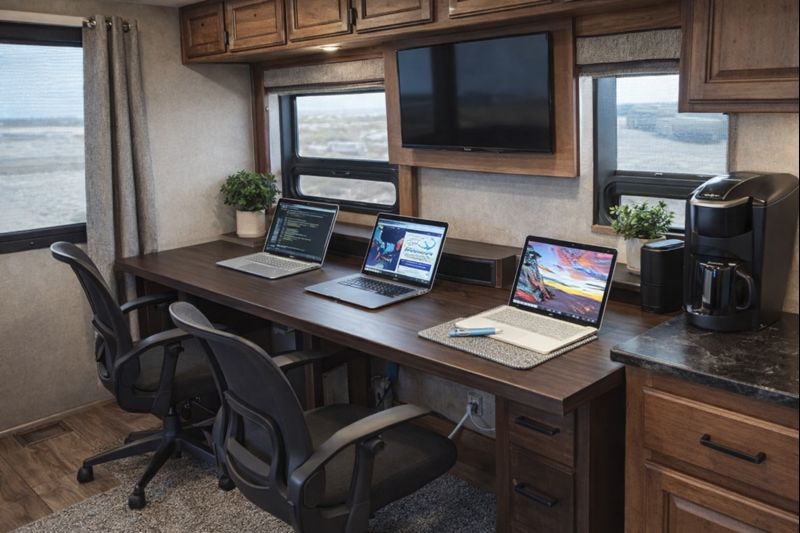
💡 Key Recommendation
Use a monitor arm with table clamp to create dual-screen workspace anywhere
Why This Matters
Creating a functional mobile office in your RV is crucial for maintaining productivity and professional standards while living on the road. Poor ergonomics from makeshift workspaces lead to back pain, neck strain, and decreased work quality, while inadequate lighting and cramped conditions can cause eye fatigue and mental exhaustion. Without a properly designed workspace, remote workers often find themselves hunched over dinette tables or working from uncomfortable couches, leading to serious health issues over time.
A well-designed mobile office setup directly impacts your earning potential and job satisfaction. Employers and clients expect professional-quality work regardless of your location, and a proper workspace enables you to deliver consistent results. When your office setup actually works, you can maintain regular business hours, participate effectively in video calls, and stay organized with your projects. This isn’t just about comfort—it’s about sustaining a viable remote work lifestyle that allows you to travel without compromising your career or income.
📋 Industry Standards & Best Practices
Ergonomic workplace standards recommend monitor screens positioned 20-26 inches from your eyes at arm’s length, with the top of the screen at or slightly below eye level to prevent neck strain. The Occupational Safety and Health Administration (OSHA) guidelines suggest keyboards and mice positioned so your arms rest comfortably at 90-degree angles, while your feet should rest flat on the floor with thighs parallel to the ground. For RV mobile offices, these standards must be adapted to compact spaces, typically requiring adjustable-height surfaces, external monitors to replace laptop screens, and strategic lighting that provides at least 500 lux for computer work without creating screen glare.
🎯 Product Recommendations
Install a wall-mounted monitor arm with full articulation to position your screen at proper ergonomic height while saving valuable desk space in your RV’s compact interior
Use a convertible standing desk converter or adjustable-height table that allows you to alternate between sitting and standing throughout your workday to improve circulation and reduce back strain
Invest in a high-quality ergonomic chair specifically sized for RV spaces—look for chairs under 25 inches wide that still provide proper lumbar support and adjustability
Complete Guide
The most common mistake RV remote workers make is trying to work exclusively from their laptop screen while hunched over the dinette table. This leads to poor posture, reduced screen real estate, and decreased productivity. After hours of craning your neck down to see your screen, you’ll understand why so many digital nomads burn out quickly.
The game-changer is investing in a quality monitor arm with a sturdy table clamp. Unlike permanent mounting solutions, a clamp-on monitor arm can transform any surface into an ergonomic workstation without drilling holes or making modifications to your RV. Look for arms that can support 24-32 inch monitors and have sufficient reach to position the screen at eye level.
Start by choosing your primary work location—typically the dinette area offers the best combination of space, lighting, and comfort. Ensure your table can support the clamp’s grip and the monitor’s weight. Most quality arms work with tables up to 2 inches thick, perfect for standard RV dinette tables.
Position your external monitor at arm’s length, with the top of the screen at or slightly below eye level. This eliminates neck strain and creates a more professional viewing experience. Use your laptop as a secondary screen for email, chat applications, or reference materials while dedicating your main monitor to primary tasks.
Cable management becomes crucial in the confined RV space. Invest in adhesive cable clips and spiral wrap to keep power cords, HDMI cables, and USB connections tidy. Nothing kills productivity like constantly untangling cables or having cords fall behind the table.
Lighting deserves special attention in your mobile office. Natural light from windows is ideal, but position your setup to avoid glare on screens. Add a quality LED desk lamp with adjustable color temperature—cooler light for focused work, warmer tones for video calls to create a more flattering appearance.
Storage solutions make or break your mobile office efficiency. Use a small rolling cart or desktop organizer to keep frequently used items accessible but contained. When it’s time to hit the road, everything should pack away quickly and securely.
Consider investing in noise-canceling headphones for video calls and concentration, especially in busy campgrounds. A wireless keyboard and mouse complete the setup, giving you flexibility to position input devices comfortably regardless of monitor placement.
Remember that your office setup should transition smoothly from work mode to living space. Choose equipment that stores compactly and surfaces that serve multiple purposes throughout your day.
Step-by-Step Instructions
Step 1
Assess your RV’s layout and identify the best location for your office, considering natural light sources, proximity to electrical outlets, and areas with sufficient headroom and floor space for a proper chair and desk setup
Step 2
Measure your chosen workspace area and select appropriately sized furniture, ensuring your desk depth accommodates monitor positioning 20-26 inches from your seated position while leaving space for keyboard and mouse
Step 3
Install proper lighting solutions including adjustable LED task lighting to supplement natural light and reduce eye strain, positioning lights to eliminate screen glare while providing adequate illumination for paperwork
Step 4
Set up your technology infrastructure with cable management solutions, surge protection, and organized storage for office supplies, creating a professional environment that can be quickly organized for video calls
💰 Cost Analysis
Initial investment: $1,200-$3,500 for complete mobile office setup including ergonomic furniture, monitor, lighting, and organizational accessories
Annual maintenance: $150-$300 for equipment updates, chair maintenance, lighting replacements, and organizational supply refreshes
5 year projection: $1,950-$4,850 total investment including initial setup and five years of maintenance and minor upgrades
Cost per year: $390-$970 annually when averaged over five years of mobile office use
🌍 Regional Considerations
Desert regions require additional consideration for heat management in your mobile office space, often necessitating extra ventilation fans or portable air conditioning units to maintain comfortable working temperatures during peak hours
Northern climates and winter camping scenarios demand efficient heating solutions for office spaces, with many RVers installing separate zone heaters or heated floor mats to maintain productivity during cold weather
High-altitude locations may require brighter task lighting to compensate for increased UV exposure and glare, while humid coastal areas need moisture control measures to protect electronic equipment and prevent mold in office storage areas
🌍 How This Works in Practice
Sarah, a graphic designer, converted her RV’s dinette area into a mobile office by installing a height-adjustable desk platform and a wall-mounted monitor arm, allowing her to maintain proper ergonomics while preserving dining space when needed
Digital marketing consultant Mike built a dedicated office nook in his Class A RV’s slide-out area, complete with built-in filing, task lighting, and a standing desk option, enabling him to work 8-hour days comfortably
Freelance writer Jennifer uses a compact corner office setup with a pivoting desk that folds against the wall when not in use, paired with a lightweight ergonomic chair that doubles as extra seating in her small travel trailer
🔍 Common Misconceptions
Many believe working from an RV dinette with a laptop is sufficient for remote work, but this setup creates severe ergonomic problems leading to neck pain, eye strain, and reduced productivity within weeks of full-time use
There’s a false assumption that proper office furniture won’t fit in RVs, when in reality many compact ergonomic solutions are specifically designed for small spaces and can dramatically improve work comfort and efficiency
Some think mobile offices require expensive custom builds, but effective setups can be created with modular furniture and accessories that adapt to different RV layouts while remaining budget-friendly
📊 Comparison Analysis
🔧 Tools & Equipment
Drill and drill bits for mounting monitor arms, desk supports, and lighting fixtures to RV walls and cabinets
Level, measuring tape, and stud finder for proper placement of office furniture and equipment in your RV’s unique layout
⏱️ Time & Cost Summary
Estimated Time: 2-4 days for complete mobile office setup including furniture assembly, equipment installation, cable management, and workspace organization
Estimated Cost: $1,200-$3,500 depending on furniture quality, technology requirements, and custom installation needs
📅 Maintenance Schedule
⚠️ Safety Considerations
FAQ
What’s the best location in my RV to set up a mobile office workspace?
How do I ensure reliable internet connectivity for my RV mobile office?
What ergonomic furniture works best for an RV mobile office setup?
How much power do I need to run a mobile office in my RV?
What’s the most space-efficient desk solution for an RV mobile office?
How do I manage cable organization and storage in my RV mobile office?
What lighting setup works best for an RV mobile office workspace?
How do I create privacy for video calls in my RV mobile office?
What storage solutions work best for RV mobile office supplies and equipment?
How do I keep my RV mobile office setup stable while driving?
What’s the best monitor setup for an RV mobile office?
How do I maintain comfortable temperature control in my RV mobile office area?
What backup power solutions should I have for my RV mobile office?
How do I set up dual monitors in a small RV mobile office space?
What printer solutions work best for an RV mobile office setup?
👨💼 Expert Insights
Occupational therapist Dr. Linda Hayes recommends RV workers change positions every 30-45 minutes, emphasizing that even the best mobile office setup requires movement breaks to prevent repetitive strain injuries
Remote work consultant and RV lifestyle expert Tom Richardson suggests investing in quality ergonomic equipment early, noting that the cost of proper furniture is minimal compared to potential healthcare costs from poor workspace setup
Full-time RVer and software developer Maria Santos advises creating a dedicated work-only zone in your RV, explaining that psychological boundaries between work and living space are crucial for maintaining productivity and work-life balance on the road
📚 Related Topics
- Optimizing RV internet connectivity for reliable remote work
- Managing RV electrical systems for high-powered office equipment
- Creating professional video call backgrounds and lighting in small RV spaces